
How to Accept Donations on a Squarespace Website (Step-by-Step Guide)
If you're running a nonprofit, church, or community organisation on Squarespace, collecting donations online is easier than you might think. Squarespace has a built-in Donation Block that handles everything — payments, recurring giving, multiple funds — with no third-party payment setup required beyond connecting Squarespace Payments or Stripe directly to your Squarespace account.
This guide walks you through setting up donations on Squarespace from scratch, and then shows you how to add SquareDonations on top to boost how much you raise.
Part 1: Setting up the Squarespace Donation Block
Step 1: Make sure you're on the right Squarespace plan
Squarespace's Donation Block is available on the Basic, Core, Plus, and Advanced plans. If you're on a lower tier, you'll need to upgrade before you can accept donations.
Step 2: Connect your payment processor
Inside your Squarespace account, go to Selling → Payments and connect either Squarespace Payments or Stripe. This is where all donation funds will land. Squarespace handles the entire payment flow — PCI compliance, receipts, refunds — directly.
Step 3: Add a Donation Block to your page
Open your page in the Squarespace editor
Click + to add a new block
Search for Donation and select it
Name your Fund (e.g. "General Fund", "Building Appeal", "Youth Programme")
Set a fundraising goal and suggested donation amounts
Choose whether to allow one-time donations, recurring donations, or both
Publish the page
That's it. Your Squarespace Donation Block is live and accepting donations securely.
Step 4: Create multiple Funds for different campaigns
Squarespace lets you create unlimited Funds inside a single Donation Block. Each Fund can have its own name, goal amount, suggested giving levels, and recurring donation settings. This means you can run a General Fund, a Capital Campaign, and an Emergency Appeal simultaneously — all from one page or across separate pages.
Part 2: Getting more from your Squarespace donations with SquareDonations
The Squarespace Donation Block is a solid foundation. But it shows donors a form and nothing else. There's no visible progress toward your goal. No feed showing that others are giving. No leaderboard recognising your top supporters. No automated donor follow-up.
That's what SquareDonations adds — an engagement and automation layer that sits on top of your existing Squarespace Donation Block without changing how payments work.
What SquareDonations adds
Donation Progress Tracker — A live progress bar that shows how much has been raised toward your Fund's goal, updating in real time as donations come in through Squarespace. Donors who can see a campaign approaching its target consistently give more and give faster.
Recent Donations Feed — A live feed of your latest donors showing names, amounts, and optional personal comments. Social proof is one of the most powerful drivers of charitable giving — when visitors see others donating, they're far more likely to give themselves.
Top Donors Leaderboard — A public ranking of your most generous supporters. Recognition drives repeat giving and larger gifts. Donors who appear on a leaderboard are significantly more likely to give again to maintain their position.
Mailchimp integration — Every new Squarespace donation automatically syncs the donor to your Mailchimp audience. Segment by Fund, donation amount, or frequency and set up automated email sequences — welcome emails, impact updates, renewal reminders — without any manual work.
Zapier automation — Trigger workflows to 6,000+ apps the moment a donation lands in Squarespace. Update your CRM, notify your team on Slack, log to Google Sheets, fire a thank-you sequence — all hands-free.
CSV import and export — Running an offline fundraising event or migrating from another platform? Import those donations so your widgets reflect every contribution, not just online ones. Export anytime for your accountant or board reports.
Step 5: Connect SquareDonations to your Squarespace site
Sign up at dashboard.squaredonations.com — no credit card required for the 14-day free trial
Authorise your Squarespace site via the dashboard — we connect via Squarespace's secure API and sync your Funds automatically
Configure your widgets — choose which ones to show, set your branding colours
Copy your embed snippet, add a Code Block to your Squarespace page beside your Donation Block, and paste it in
Publish — your widgets are live and will update automatically on every donation
No Stripe setup with us. No payment account. No transaction fees from SquareDonations ever.
Squarespace vs Squarespace + SquareDonations
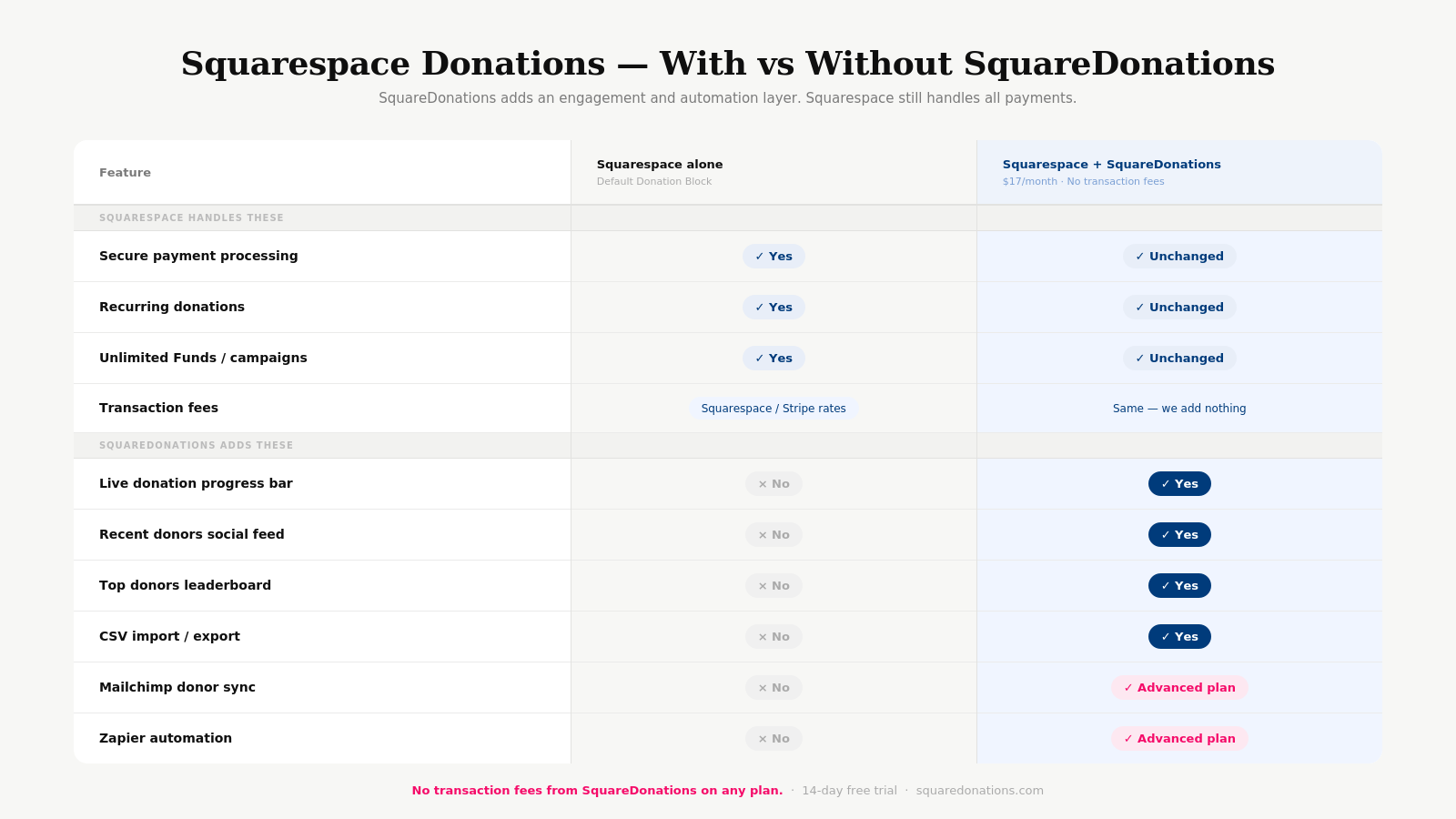
Squarespace alone + SquareDonations Secure payment processing Yes Yes (unchanged) Recurring donations Yes Yes (unchanged) Unlimited Funds / campaigns Yes Yes (unchanged) Live donation progress bar No Yes Recent donors social feed No Yes Top donors leaderboard No Yes Mailchimp donor sync No Yes (Advanced) Zapier automation No Yes (Advanced) CSV import / export No Yes Transaction fees Squarespace/Stripe rates Same — we add nothing
Pricing
SquareDonations charges a flat monthly fee. No transaction fees, ever.
Basic — $17/month: All three engagement widgets, CSV import/export, unlimited Funds, email support
Advanced — $29/month: Everything in Basic plus Mailchimp, Zapier, and priority support
Both plans include a 14-day free trial. No credit card required to start.
FAQs
Does SquareDonations replace my Squarespace Donation Block? No. Squarespace's Donation Block handles all payments as normal. SquareDonations connects via Squarespace's API to add engagement widgets and automation on top. You don't change anything about how you collect donations.
Do I need to set up Stripe or a payment account with SquareDonations? No. Your payment setup stays entirely within Squarespace. SquareDonations never touches your transactions.
Does SquareDonations charge transaction fees? Never. You pay one flat monthly subscription. All donation processing fees are set by Squarespace and Stripe — SquareDonations adds zero on top.
Can I use SquareDonations with multiple Funds? Yes. SquareDonations syncs with all your Squarespace Funds. Each gets its own progress tracker, donor feed, and leaderboard.
How long does setup take? Under 60 seconds once your Squarespace Donation Block is live. Connect your site, configure widgets, paste one embed code, done.